
What the Green Dot in the Upper Corner of Your Android Phone Really Means
A Small Symbol With an Important Purpose
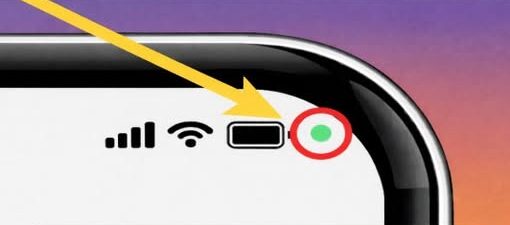
Many Android users have noticed a small green dot appearing in the upper right corner of their screens. Though subtle, this indicator carries significant meaning related to personal privacy and device security.
The green dot is a built-in privacy feature designed to notify users when specific hardware components are active. Its primary function is to alert you when an application is using your phone’s camera, microphone, or both.
This feature was introduced to increase transparency and provide real-time awareness of how apps interact with sensitive tools on your device.
When and Why the Green Dot Appears
The indicator typically becomes visible when you open an app that requires access to the camera or microphone. Common examples include video calling platforms, voice recording applications, and camera tools.
If you are taking a photo, recording a video, leaving a voice message, or participating in a video call, the appearance of the green dot is expected. It simply confirms that the app you are actively using has permission to access those features.
In these situations, there is no cause for concern. The symbol acts as a confirmation that the requested hardware is currently in use.
The dot may remain visible for the duration of that access. Once the camera or microphone is no longer being used, the indicator disappears.
Understanding Its Role in Privacy Protection
Smartphones store vast amounts of personal information. Cameras and microphones, in particular, are highly sensitive components because they can capture images, video, and audio from your surroundings.
The green dot exists to prevent hidden or unnoticed access to these tools. Instead of relying solely on background settings or permission lists, users receive a visible, immediate signal whenever these components are activated.
This real-time notification empowers users to stay informed about what is happening on their devices. Rather than discovering unexpected permissions later, the alert appears the moment access begins.
By offering this transparency, Android devices strengthen user control over personal data and device behavior.
What to Do If the Dot Appears Unexpectedly
There may be times when the green dot shows up even though you are not actively taking photos, recording audio, or making a call. In such cases, it is important to investigate further.
First, avoid panic. The presence of the indicator does not automatically mean that your phone has been compromised. It simply signals that an app is accessing the camera or microphone.
To determine which app is responsible, swipe down from the top of your screen to open the notification panel. This action reveals more detailed information about current device activity.
Tapping on the privacy indicator expands the notification and displays the specific app using the hardware. The system clearly identifies whether the camera, microphone, or both are being accessed.
Once you know which app is responsible, you can decide whether the access is appropriate.
Reviewing and Adjusting App Permissions
If the access aligns with something you recently opened or used, no further action may be necessary. However, if the activity seems unexpected, you have the option to adjust permissions.
To manage these settings, open your device’s Settings menu. From there, select the Privacy or Permissions section, depending on your device’s interface.
Within this area, you can view a list of applications that have requested access to sensitive features such as the camera and microphone.
You may choose to allow access only while using the app, deny access entirely, or review previously granted permissions.
Making these adjustments helps ensure that apps only use hardware features when you intend them to do so.
Why Regular Permission Reviews Matter
Over time, users download and install numerous applications. Some apps require camera or microphone access to function properly, while others may request permissions that are not essential.
Regularly reviewing these permissions is a proactive way to maintain device security. Even if you trust an app, it is wise to confirm that its access aligns with your expectations.
Checking permissions also helps identify unused applications that may still retain hardware access. Removing unnecessary permissions reduces potential privacy risks.
This habit strengthens your overall control over your device and reinforces personal data protection.
How the Feature Enhances Transparency
The introduction of the green dot reflects broader efforts to improve user awareness within mobile operating systems. Transparency plays a key role in modern digital privacy practices.
Instead of operating silently in the background, Android devices now clearly signal when important hardware components are active.
This visible cue removes uncertainty and reduces the likelihood of unnoticed access.
By making hardware usage obvious, users can immediately recognize when their camera or microphone is engaged.
Common Situations Where the Dot Is Normal
Video conferencing is one of the most common reasons for the indicator to appear. During a call, both the camera and microphone may be active simultaneously.
Voice recording applications also trigger the dot, as they require microphone access to capture audio.
Similarly, camera apps and social media platforms that include photo or video features will activate the indicator while in use.
In these cases, the green dot functions as a confirmation of expected activity.
Maintaining Awareness Without Alarm
The presence of the green dot should be viewed as an informational tool rather than a warning sign.
It is designed to inform, not to alarm. Seeing it during normal app usage is part of standard device operation.
However, if it appears unexpectedly, taking a moment to review active applications ensures that your privacy remains intact.
This balance between awareness and reassurance is central to the feature’s purpose.
A Step Toward Greater User Control
Modern smartphones rely on complex interactions between apps and hardware components. Without clear indicators, users might remain unaware of when sensitive tools are active.
The green dot addresses this gap by providing immediate visibility.
Combined with accessible privacy settings, it allows users to monitor and control how their devices operate.
By staying attentive to these indicators and reviewing permissions periodically, users can maintain confidence in their device’s security.
Final Thoughts on the Privacy Indicator
The green dot in the upper corner of an Android phone represents a practical privacy safeguard. It appears whenever an app uses the camera, microphone, or both.
Its presence confirms active hardware usage and gives users real-time insight into app behavior.
If the activity is expected, no action is required. If it seems unusual, reviewing app permissions through the Settings menu provides a simple solution.
This small visual cue reflects ongoing improvements in user awareness and digital security, reinforcing the importance of transparency and personal control in everyday smartphone use.