
TV Remote Not Working? Simple Battery Checks That Can Help
Start With the Batteries Before Assuming the Remote Is Broken
A television remote that suddenly stops responding can interrupt an otherwise relaxing evening. Pressing the buttons repeatedly rarely explains the problem, but a few straightforward checks can help narrow it down.
Depleted batteries are one possibility, although they are not the only explanation. Incorrect installation, damaged contacts or a connection problem can also prevent a remote from controlling the television.
The most useful approach is to work through these possibilities in order. Confirming the correct battery type and checking the compartment can prevent unnecessary replacements or the mistaken conclusion that the remote itself has failed.
Good storage habits also help keep replacement batteries ready for use. Together, these small steps make troubleshooting easier when the remote becomes unreliable.
Use the Battery Type Specified for the Remote
Before buying replacements, check the instructions or markings for the required battery size and type. A battery that physically fits is not necessarily the right choice if its characteristics do not match the device’s requirements.
Manufacturer guidance is particularly important when considering rechargeable batteries. Some remotes have specific voltage requirements, so compatibility should be confirmed rather than assumed.
Disposable batteries are intended for one-time use and need replacing after their stored energy is depleted. Rechargeable batteries can be used again after charging with an appropriate charger.
Rechargeable options may have a higher initial cost, but they can be practical for households that regularly replace batteries. Their usefulness depends on compatibility and the household’s pattern of use.
Neither option removes the need for correct handling. Follow the battery and device instructions, and use a compatible charger for rechargeable cells.
Replace the Complete Set Together
When a remote requires more than one battery, replacing the whole set at the same time is generally preferable to changing only one cell. This helps avoid pairing a fresh battery with one that is already partly depleted.
Different batteries may discharge unevenly when used together. Mixing old and new cells can reduce performance and may increase the possibility of leakage.
The same care applies to differences in battery type, brand and charge level. A convenient spare from another device may not be a suitable match for the remaining battery in the remote.
For rechargeable batteries, use compatible cells with a similar charge level. Follow the manufacturer’s guidance rather than combining whatever happens to be available.
Replacing batteries as a matched set also makes troubleshooting clearer. If the remote remains unresponsive, there is less uncertainty about whether one weak cell is responsible.
Check the Direction of Each Battery
Even new batteries will not solve the problem if they are installed incorrectly. Examine the positive and negative markings inside the compartment before closing the cover.
Match each battery to the indicated orientation. Do not assume that neighboring batteries face the same direction, since the arrangement depends on the remote’s design.
If the remote stopped working immediately after a battery change, installation is a useful first check. Confirming the orientation takes little time and may resolve the issue without any further work.
The compartment should also be inspected for anything that prevents the batteries from sitting properly. Visible damage or residue deserves attention before another set is inserted.
Inspect the Contacts Without Handling Leakage
Battery contacts provide the connection between the cells and the remote’s electronics. Dirt, residue or corrosion can interfere with that connection and cause an apparently unexplained failure.
Remove the batteries before inspecting the compartment. Look for visible contamination, signs of leakage or damaged metal contacts.
If residue is present, avoid touching it with bare hands. Follow the manufacturer’s cleaning instructions rather than applying an improvised cleaning method.
Extensive corrosion or damaged contacts may require assistance. Installing fresh batteries does not repair physical damage inside the compartment.
This check is especially useful when replacement batteries make no difference. The issue may be the connection to the cells rather than the amount of energy they contain.
Store Replacements Somewhere Cool and Dry
Having spare batteries available can make an unexpected failure easier to manage. Their condition, however, depends partly on how they have been stored.
Choose a cool, dry location away from direct sunlight and sources of heat. Moisture and unsuitable temperatures can affect performance or contribute to damage.
Original packaging is useful because it keeps batteries organized and helps separate their terminals from other objects. A suitable battery storage box can serve a similar purpose.
Avoid keeping loose batteries among metal items that could connect the terminals. A drawer containing miscellaneous household objects is less suitable than a dedicated storage arrangement.
Follow the battery manufacturer’s storage recommendations. Keeping replacements protected and easy to identify is more useful than simply accumulating loose spares.
A Camera May Help Check an Infrared Remote
Some remotes communicate through infrared signals. With a compatible smartphone camera, it may be possible to see an indication that the remote is transmitting.
Open the phone’s camera application and point the camera toward the remote’s infrared transmitter. Press a button while watching the phone screen for a flashing light.
A visible flash suggests that infrared output may be present. It does not confirm that every button works, that the correct command is being sent or that the television is receiving it.
The absence of a visible flash is also inconclusive. Some smartphone cameras filter infrared light, so the test may not work with a particular camera.
Not every remote relies on infrared, either. Bluetooth and radio-frequency remotes cannot be assessed in the same way merely by looking for light through a camera.
Treat this as a limited troubleshooting check rather than a complete diagnosis. It can provide one clue, but the remote’s connection method and the camera’s capabilities affect the result.
Avoid Improvised Battery Substitutes
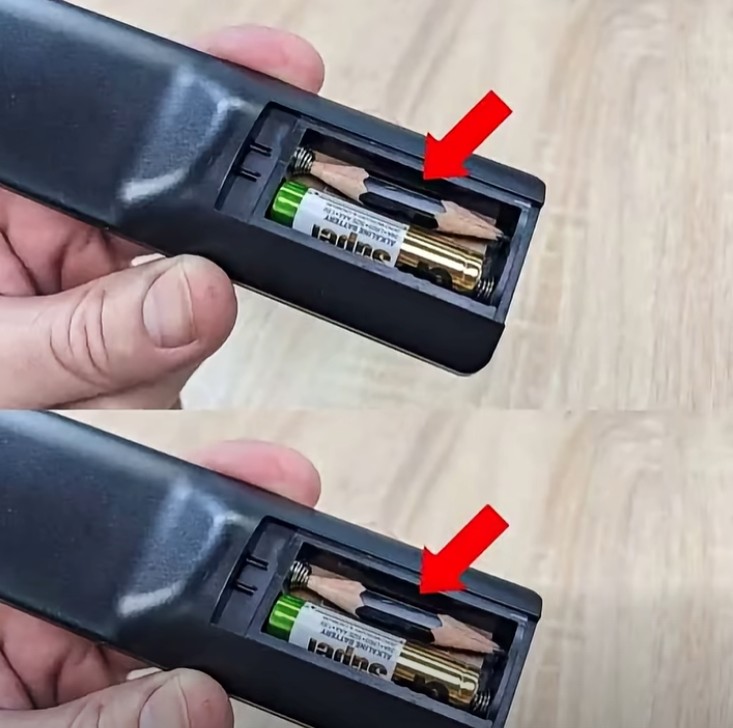
Online battery tricks sometimes suggest placing a pencil or another household object inside a remote’s battery compartment. Such objects are not proper sources of electrical power and should not be treated as replacement batteries.
Improvised inserts can damage contacts, fit poorly or create electrical problems. A temporary inconvenience does not make an unsuitable object a reliable solution.
Use the correct replacement battery type instead. If none is available, the television may offer another supported way to control it.
Depending on the model, alternatives may include physical buttons on the television, a compatible smartphone application or another supported remote. These options depend on the device and its settings.
Choosing a supported control method avoids introducing a second problem while trying to solve the first.
If Fresh Batteries Do Not Restore Operation
A remote that remains unresponsive after a correctly installed, compatible replacement set may have a problem elsewhere. Its electronics, the television’s receiver or the connection settings could be involved.
At that point, consult the manufacturer’s troubleshooting instructions. Guidance for the specific model is more useful than assuming all remotes operate in the same way.
Keep the earlier checks in mind when describing the problem: the battery type used, whether the set was replaced together and whether the compartment showed damage. These details help distinguish a battery issue from another fault.
Reliable operation begins with simple habits. Using compatible batteries, replacing them together, storing spares properly and checking the compartment provide a practical foundation for keeping a remote ready for everyday use.