
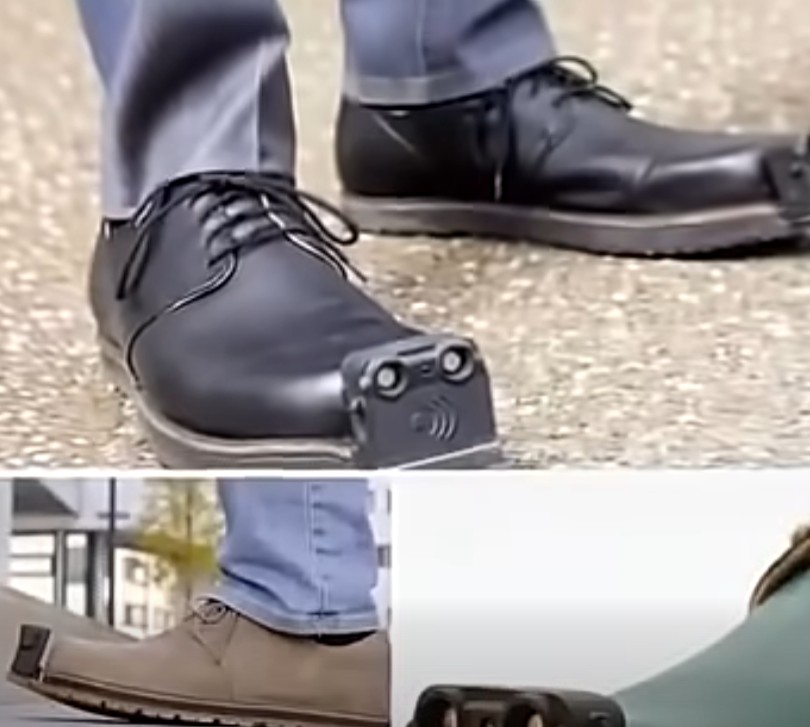
InnoMake Smart Footwear Uses Obstacle Alerts to Support People With Visual Impairments
Adding Information to Everyday Journeys
Walking through a neighborhood involves responding to a changing environment. A familiar pavement may contain a newly parked vehicle, an object left outside a building or another obstruction that was not there during the previous journey.
People with visual impairments navigate these situations using different combinations of skills, experience and mobility tools. White canes, guide dogs, hearing, touch and knowledge of a route can all contribute to the information available while traveling.
InnoMake introduces another possible source of information. Developed by Austrian company Tec-Innovation, the footwear-based system uses sensors to detect obstacles and communicate alerts through vibration or sound.
The purpose is to notify the wearer about objects within the equipment’s detection area. It provides an additional signal that the person can consider alongside information gathered through established mobility methods.
The concept does not remove the need for judgment or guarantee that every hazard will be detected. Its potential usefulness lies in offering another way to notice certain obstacles before reaching them.
How Footwear Becomes an Assistive Device
InnoMake combines footwear with electronic sensing equipment. When the sensors detect an object within their operating area, the system produces feedback intended to alert the wearer.
The arrangement places the equipment close to the ground and allows it to move with the user’s feet. Instead of requiring someone to hold a separate detector continuously, the system incorporates that function into something worn during the journey.
Depending on the configuration, a sensor unit is used with compatible footwear. Compatibility matters: a removable component should not be assumed to work with every ordinary shoe without the appropriate attachment arrangement.
The distinction between the footwear and the sensing component also matters when considering comfort and practical use. The shoe must remain suitable for walking while accommodating the equipment securely.
The resulting alert is a notification rather than an instruction that independently directs the person around an obstacle. The wearer still needs to interpret it and decide how to proceed.
For example, an alert may prompt someone to pause, slow down or investigate using another mobility tool. The appropriate response depends on the surroundings and the person’s familiarity with the equipment.
Design Informed by Personal Experience
Markus Raffer, a co-founder involved in developing InnoMake, is visually impaired. His experience contributed to the effort to address difficulties encountered while moving through changing environments.
That perspective is relevant because the usefulness of an assistive device cannot be judged solely by whether its sensors operate. The equipment must also provide information at a useful moment and in a form the wearer can understand.
A technically successful detection may have limited practical value if the warning is confusing or difficult to distinguish during a walk. Likewise, a device can become burdensome if operating it requires too much attention.
Involving people with direct experience helps keep development focused on these questions. Their feedback can identify differences between a promising demonstration and equipment that fits into everyday routines.
The underlying problem is practical: how to give someone additional awareness of nearby obstructions without making the journey more complicated. That goal provides a useful measure for evaluating the design.
What an Obstacle Alert Can Tell the Wearer
Electronic obstacle detection provides a particular kind of information. It indicates that something has been detected within the area the system is monitoring.
That information is different from a complete description of the surroundings. A warning does not necessarily explain what the object is, how it is shaped or which route around it would be preferable.
The difference is important when describing the technology’s capabilities. Detecting an obstruction is not the same as understanding an entire street or independently planning a safe journey.
A sensor’s position and detection area also affect what it can identify. Equipment attached to footwear should not automatically be assumed to cover objects at every height or every direction.
The same caution applies to changes in the walking surface. The ability to detect an object does not, by itself, establish that a system will reliably recognize every descending step, hole or edge.
These limits do not make additional alerts meaningless. They define the circumstances in which the information may be useful and explain why it belongs alongside other mobility methods.
Vibration and Sound Provide Nonvisual Feedback
A mobility device intended for people with limited or no vision needs accessible ways to communicate. InnoMake uses vibration and sound so that receiving an obstacle warning does not depend on reading a display.
Vibration provides physical feedback through the equipment. Sound offers another channel for bringing a detection to the wearer’s attention.
These methods serve the same broad purpose but may suit different preferences and circumstances. The value of an alert depends partly on whether the person can notice and interpret it comfortably while continuing to monitor the environment.
Alert design also involves managing competing demands. A warning should be noticeable without becoming an unnecessary distraction or an obstacle to understanding other information.
Users need time to learn what the signals mean. Familiarity can help them distinguish a useful warning from a situation that requires further investigation through a cane, assistance or another established method.
This learning process is part of adopting the equipment. Wearing a sensor does not instantly provide an understanding of its strengths, limitations or behavior in every setting.
Supporting the User’s Own Decisions
Independence is not defined by using one particular tool or refusing assistance. People choose combinations of methods according to their needs, preferences and circumstances.
For one person, additional footwear-based alerts may fit comfortably into a familiar routine. Another may find that their existing mobility tools provide the information they need more effectively.
Daily journeys also vary. Traveling to work, visiting a shop and walking through an unfamiliar place can place different demands on the person and the equipment they use.
The purpose of an assistive device is to increase useful choices. Its value should be assessed through the information it provides and how well that information supports the individual’s decisions.
Describing smart footwear in this way keeps the wearer’s role central. The person remains responsible for interpreting the situation rather than being portrayed as a passenger guided automatically by the technology.
White Canes and Guide Dogs Have Different Roles
Smart footwear should not be presented as a complete replacement for a white cane or guide dog. These aids provide forms of assistance that an electronic obstacle warning does not duplicate.
A white cane offers physical information through contact with the environment. It can help a user investigate an obstruction or assess aspects of the walking surface.
A guide dog provides assistance developed through specialized training and the working relationship with its handler. That role involves more than signaling that an object is nearby.
Footwear-based sensing supplies another input. It may alert someone to a detected obstruction, but it does not reproduce every function of either established aid.
Using several sources of information can be appropriate, provided the person understands what each contributes. An additional signal is most useful when its meaning and limitations are clear.
Qualified orientation and mobility professionals can help assess how unfamiliar equipment fits with a person’s existing skills. The decision should reflect individual needs rather than a general claim that newer technology is necessarily better.
Object Detection and Object Recognition Are Different
Work involving artificial intelligence and camera-based systems introduces a further distinction. A device may detect the presence of something without identifying what that object is.
Recognition systems aim to provide additional context. Instead of issuing only a proximity warning, such technology may attempt to distinguish between different features of an environment.
That possibility has been explored in connection with the InnoMake concept. However, research and development should not be confused with a feature confirmed in every available version of a product.
Adding a camera also does not automatically create reliable understanding. Recognition depends on what is captured and how successfully the software interprets it under the conditions encountered.
Lighting, camera placement and the surrounding scene can all affect the information available. These considerations make it important to describe recognition as a capability that must be demonstrated, rather than an assured outcome of adding artificial intelligence.
The aim remains practical: providing information the wearer can use. More detailed output is valuable only when it is sufficiently accurate, timely and understandable.
Comfort, Charging and Durability Shape Daily Use
A wearable product must work as something a person can comfortably wear. With smart footwear, the electronics need to coexist with the ordinary requirements of fit and movement.
A sensor attachment should not make walking unnecessarily awkward. Its placement, weight and security matter because the equipment moves repeatedly with the user’s feet.
Power is another routine consideration. Electronic sensing requires charging, and the wearer needs an accessible way to understand whether the equipment is ready for use.
Battery performance should be considered as part of the overall journey. A useful device needs to fit into a charging routine without leaving the person uncertain about whether feedback remains available.
Durability is equally relevant. Footwear encounters dust, movement, uneven surfaces and changing weather, so the sensing component must be assessed within those practical conditions.
These questions are separate from whether a device can detect an obstacle during a demonstration. Everyday usefulness depends on the complete experience of wearing, maintaining and operating it.
Clear Controls and Appropriate Alerts Matter
Accessible controls help people use equipment without unnecessary difficulty. Settings and instructions need to be understandable, and the user should be able to tell how the system is operating.
Detection accuracy involves more than registering objects. A system also needs to avoid producing so many irrelevant warnings that useful information becomes difficult to recognize.
Too little feedback may leave important detections unnoticed. Too much may demand attention without providing enough value in return.
The balance depends on the device, the environment and the wearer. That is another reason practical experience matters when deciding whether smart footwear is a suitable addition.
Affordability also affects access. A device cannot serve its intended audience widely if the overall cost makes it unrealistic for people to obtain or maintain.
No price or current purchasing information is established here. Its accessibility should therefore not be judged through assumptions about availability or expense.
Inclusive Design Starts With Listening
InnoMake illustrates a broader approach to development: designing around the experiences of people who will use the product. That involves considering different abilities and circumstances from the beginning.
Useful feedback can concern something as basic as an uncomfortable attachment or as consequential as a warning that arrives too late. Both influence whether the equipment earns a place in someone’s routine.
Listening to users can also reveal priorities that are not obvious from a technical specification. A simpler signal may be more useful than a larger quantity of information that takes longer to interpret.
Inclusive design therefore involves more than adding features. It requires evaluating how those features affect the person’s experience and whether they address the original problem.
The strongest measure of progress is practical usefulness. Dependability, comfort and accessible operation are central requirements rather than secondary details.
An Additional Tool With Defined Limits
Sensor-equipped footwear offers a way to place obstacle alerts within an object already used during everyday travel. That makes InnoMake an interesting example of wearable assistive technology.
Its purpose is specific: to provide information about detected obstacles through feedback the wearer can receive without looking at a screen. It does not establish an obstacle-free route or remove every risk associated with movement.
Future developments may add context or improve performance, but those possibilities should remain separate from capabilities already demonstrated in a particular system.
For people considering such equipment, the meaningful question is how well it complements their own mobility methods. The value lies in useful information, informed choice and a design that respects the individual’s control over their journey.